

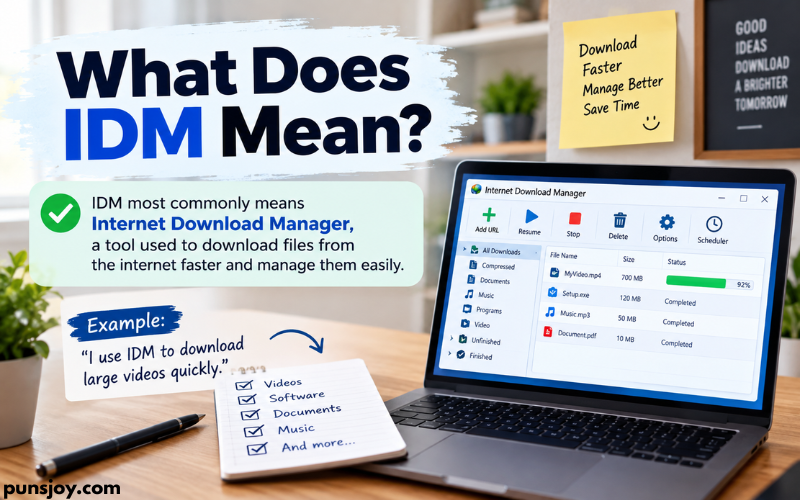
IDM most commonly means Internet Download Manager, a software program used to download files from the internet. It can help users download videos, documents, music, programs, images, and other files faster and manage those downloads in one place. IDM can also pause and resume downloads, which is useful when a large file takes a long time to download or an internet connection is interrupted.
The meaning of IDM can change depending on where you see it. On websites, computer forums, and technology discussions, IDM usually refers to Internet Download Manager. In other fields, the same three letters can have completely different meanings. For example, IDM may refer to identity management, intelligent dance music, or other technical and professional terms.
In this article, I will explain what IDM means, how Internet Download Manager works, what it is used for, its main features, its advantages and limitations, and some other meanings of IDM. If you have recently seen “IDM” while downloading a file or browsing a technology website, this guide will help you knowing exactly what it means.
Related Post: What Does IMY Mean in Text:
What Does IDM Stand For?
IDM stands for Internet Download Manager when the term is used in the context of computers, downloads, and internet software.
Internet Download Manager is a download management program developed for Windows computers. Instead of relying only on the normal download feature built into a web browser, IDM provides additional tools for organizing and controlling downloads.
For example, if I download a large video through a browser and the connection stops halfway through, the browser may or may not allow me to continue the download from where it stopped. IDM is designed to handle interrupted downloads more effectively. It can split downloads into multiple sections and download those sections at the same time, depending on the server and connection.
IDM can also detect certain downloadable files while browsing the web. When supported content is detected, it may show a download option that allows the user to send the file to IDM.
So, in simple terms:
IDM = Internet Download Manager
It is mainly used to download, pause, resume, organize, and manage files from the internet.
What Is Internet Download Manager?
Internet Download Manager is a Windows download manager designed to make downloading files more convenient.
A download manager is different from a regular web browser download system because it gives the user more control over individual downloads. Instead of simply clicking a file and waiting for it to finish, users can organize downloads, schedule them, pause them, resume them, and monitor their progress.
IDM is especially useful for larger files. A small image may download almost instantly, so using a separate download manager may not make much difference. A large software package, video, archive, or other file can take much longer. In those cases, features such as pause and resume can become more useful.
IDM also provides categories for different types of downloads. Files can be organized into groups such as documents, music, programs, compressed files, and videos. This makes it easier to find previously downloaded content.
The software is mainly associated with Windows. It is not the same thing as a web browser. Instead, it works alongside supported browsers to manage downloads.
How Does IDM Work?
IDM works by taking control of supported downloads and managing the transfer between the website’s server and your computer.
When I start a supported download, IDM can divide the file into several sections. These sections may be downloaded simultaneously. The goal is to use the available connection efficiently and reduce the total download time.
The exact speed depends on several factors. Your internet connection is only one part of the process. The server providing the file also matters. If the server limits download speed, IDM cannot magically remove that limitation.
IDM also keeps information about the download so it can attempt to continue an interrupted transfer. For example, if your computer loses its internet connection while a large file is downloading, IDM may be able to resume the download rather than starting again from the beginning.
The process is generally simple:
- I open a supported website or download page.
- I select a downloadable file.
- IDM detects the download when supported.
- IDM opens a download window with information about the file.
- I choose where to save the file.
- IDM starts and manages the download.
- After completion, the file is saved on the computer.
Not every website or file will work in exactly the same way. Website technology, server restrictions, browser settings, and file protection can affect how IDM behaves.
What Is IDM Used For?
The main purpose of IDM is to manage internet downloads.
People may use it for many types of files, including software installers, documents, images, videos, compressed files, and other downloadable content.
One common reason people use IDM is to have better control over large downloads. If a file takes 30 minutes to download, being able to pause it and continue later can be convenient.
IDM can also help organize downloaded files. Instead of leaving everything in one general download folder, users can separate files according to type.
Another useful purpose is scheduling. A user can arrange downloads to start at a particular time. This can be useful when someone wants a large download to run when the computer is not being used heavily.
IDM can also show download progress, remaining time, file size, and transfer speed. These details make it easier to understand what is happening during a download.
However, IDM is not necessary for every user. Modern browsers already have built-in download managers. For small files and normal everyday downloads, the browser’s own system may be enough.
Main Features of IDM
Internet Download Manager has several features that make it different from a basic browser download tool.
Download Acceleration
One of IDM’s well-known features is its ability to use multiple connections for a download. The file can be divided into sections, allowing several parts to be transferred at the same time when the server permits it.
This can improve download performance in suitable situations. However, it does not guarantee that every download will become faster. The website server, internet connection, network congestion, and other technical factors all affect speed.
Pause and Resume
IDM allows users to pause supported downloads and resume them later.
This is useful for large files. If I need to stop using my internet connection for a while, I can pause a download instead of canceling it.
The resume feature can also help after certain connection problems. Whether a download can be resumed depends on the server and the type of file being downloaded.
Download Scheduling
IDM includes scheduling tools that allow users to control when downloads take place.
For example, someone with a limited internet connection may prefer to download large files at night. Scheduling can reduce the need to manually start each download.
This feature can also be useful when several files need to be downloaded in a particular order.
Download Categories
IDM can organize downloads into categories. Different types of files can be placed into different groups.
This can make a busy download folder easier to manage. Instead of searching through one long list of files, I can look in the category that matches what I downloaded.
Browser Integration
IDM can work with supported web browsers to detect downloads.
After integration is configured correctly, IDM may appear when a downloadable file is detected. This saves the user from manually copying download links into a separate application.
Browser integration can depend on browser settings, extensions, operating system permissions, and the current version of IDM.
Download Queue
A download queue lets users manage multiple files.
Instead of starting every download at the same time, users can arrange files and control how downloads are processed. This can be useful when downloading several large files.
Error Recovery
Internet connections are not always stable. IDM includes features designed to recover from certain download errors and interruptions.
This does not mean every failed download can be recovered. Some servers do not support resuming, and some downloads may expire or use temporary links.
Is IDM Faster Than a Browser?
IDM can sometimes download files faster than a browser, but it is not correct to say that IDM will always be faster.
IDM can use multiple connections to download different parts of a file at the same time. This can make better use of an available connection when the server allows multiple connections.
However, download speed is controlled by several factors. Your internet package, Wi-Fi quality, network traffic, distance from the server, server capacity, and website restrictions can all affect performance.
For example, if a website limits a file to a very low speed, installing IDM may not remove that restriction. In another situation, a server may support multiple connections and IDM may achieve a higher speed than the browser.
So I would describe IDM as a download management tool that can improve download performance in some situations, rather than a program that automatically makes every internet connection faster.
Can IDM Download Videos?
IDM can detect and download certain online video content when the website and content format are supported.
When IDM recognizes supported video content, it may display a download option. The available quality and file format can depend on how the website delivers the video.
This is important because not every online video can be downloaded through IDM. Some websites use streaming systems, encryption, digital rights management, temporary URLs, or other technologies that prevent normal download detection.
Users should also respect the website’s terms, copyright rules, and the rights of the content owner. Having a technical option to download something does not automatically mean that the content is free to copy or redistribute.
Is IDM Safe to Use?
IDM itself is widely known as Windows download-management software, but users should always obtain software from the developer’s official source or another trusted distribution channel.
This matters because unofficial websites sometimes offer modified installers, fake versions, or bundled software. A download manager should not be downloaded from a random website simply because the file name looks correct.
I also recommend keeping the software updated and using normal computer security practices.
Users should be especially careful with websites offering “cracked,” “patched,” or unauthorized versions of IDM. These files can be modified and may contain unwanted programs or other security risks.
A genuine application from a trusted source is much safer than an unknown modified copy.
Is IDM Free?
IDM is commercial software, so users may encounter a trial period and then need a license to continue using it according to the software’s terms.
The exact licensing terms and available options can change over time, so users should check the official IDM website for the current information.
It is important not to confuse the official trial or licensed version with websites offering “free full versions” or pirated copies. Those unofficial versions can create security and legal problems.
If someone only needs basic downloads, a browser’s built-in download manager may be enough. If someone frequently downloads large files and wants advanced download controls, a dedicated download manager may provide more useful features.
What Is the Difference Between IDM and a Browser Download Manager?
A browser already includes a basic system for downloading files. You can click a download link, watch its progress, pause some downloads, and open the downloaded file.
IDM provides a separate and more advanced system.
The main difference is control.
A browser download manager is convenient because it is already built into the browser. You usually do not need to install anything extra.
IDM is designed specifically around downloading. It adds features such as download scheduling, download queues, categories, connection management, and stronger resume capabilities for supported downloads.
For occasional small downloads, the browser may be all you need.
For frequent downloads or large files, IDM may be more useful because it gives you additional controls.
Why Do People Use IDM?
People use IDM for different reasons.
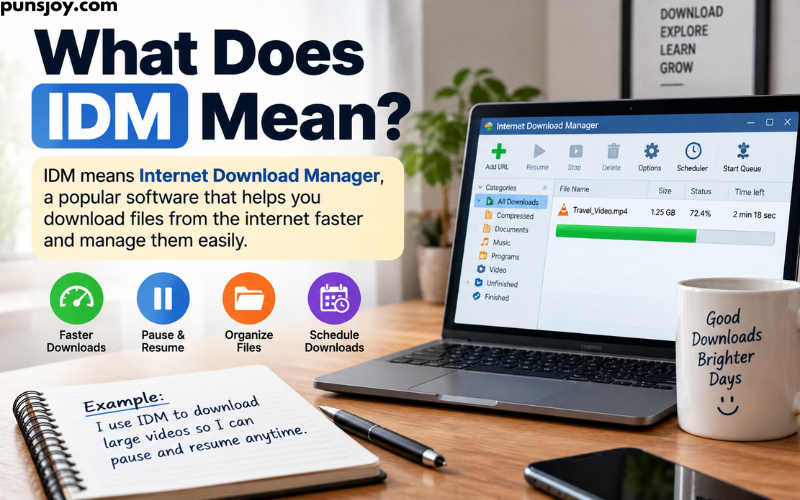
Some users want faster downloads when the server supports multiple connections. Others mainly want the ability to pause and resume large files.
For me, one of the most practical reasons to use a download manager is organization. When several large files need to be downloaded, having one place to monitor them is easier than managing each download separately in a browser.
IDM can also be useful when downloading files over an unstable connection. Instead of losing all progress after a connection problem, supported downloads can sometimes continue from where they stopped.
Another reason is scheduling. Users can decide when certain downloads should run rather than manually starting each one.
What Does IDM Mean in Chat?
In casual online conversations, “IDM” can have meanings other than Internet Download Manager.
One possible meaning is “I Don’t Mind.” In text messages or chats, someone may write “IDM” to say that they are okay with something.
For example:
Person A: “Do you want to sit here?”
Person B: “IDM.”
In this context, IDM means “I Don’t Mind.”
This is very different from Internet Download Manager.
The surrounding conversation usually makes the meaning clear. If someone is discussing downloading software, files, browsers, or videos, IDM probably means Internet Download Manager. If someone is chatting casually, “I Don’t Mind” may be the intended meaning.
Other Meanings of IDM
IDM is an abbreviation used in several areas, so the meaning depends on context.
Identity Management
In technology and cybersecurity, IDM can refer to Identity Management.
Identity management involves controlling and managing digital identities. It can include user accounts, authentication, access permissions, and the systems used to determine who can access particular resources.
This meaning is common in business and IT discussions.
Intelligent Dance Music
IDM can also stand for Intelligent Dance Music, a term associated with a style or category of electronic music.
The term is often used when discussing electronic music artists, albums, production techniques, and music communities.
Integrated Disease Management
In agriculture and plant science, IDM can refer to Integrated Disease Management.
This approach uses several methods to reduce or control diseases affecting crops. Depending on the context, these methods can include cultural practices, resistant varieties, biological methods, monitoring, and carefully selected treatments.
These examples show why it is important not to assume that IDM always means Internet Download Manager.
How Do I Know Which Meaning of IDM Someone Means?
The easiest way to identify the meaning is to look at the words around “IDM.”
If you see phrases such as:
- download
- file
- browser
- video
- download speed
- installation
- extension
- Windows
then IDM almost certainly refers to Internet Download Manager.
If you see words such as:
- account
- authentication
- access
- users
- cybersecurity
then IDM may mean Identity Management.
If the conversation is about music, IDM may refer to Intelligent Dance Music.
If someone uses IDM in a casual text message, it may mean “I Don’t Mind.”
The abbreviation itself does not provide enough information. Context is what tells us which definition is correct.
FAQs
What does IDM mean on a computer?
On a computer, IDM usually means Internet Download Manager. It is software designed to manage downloads and provide features such as pause, resume, scheduling, download categories, and browser integration.
What does IDM mean in texting?
In texting, IDM can mean “I Don’t Mind.” The meaning depends on the conversation. If the topic is computer downloads, it may instead refer to Internet Download Manager.
Is IDM a download manager?
Yes. Internet Download Manager is specifically designed to manage downloads from the internet.
Does IDM increase internet speed?
IDM does not increase the actual speed provided by your internet service. It can sometimes improve download performance by using multiple connections when supported by the server, but results vary.
Can IDM resume a failed download?
IDM can resume many interrupted downloads, but this depends on the server and how the particular download is provided. Some downloads cannot be resumed.
Can IDM download every video?
No. IDM cannot download every online video. Website technology, streaming methods, encryption, DRM, and other restrictions can prevent video detection or downloading.
Is IDM only for Windows?
Internet Download Manager is primarily a Windows application. Users on other operating systems may need a different download manager.
Do I need IDM to download files?
No. You can download files using a web browser without IDM. IDM is an optional tool that provides additional download-management features.
Is Internet Download Manager the same as a browser?
No. IDM and a web browser serve different purposes. A browser is used to visit websites and access online content, while IDM is specialized for managing downloads.
Is IDM safe?
The legitimate version of IDM is established download-management software, but users should obtain it from a trusted source. Avoid unofficial cracked or modified versions because they can contain unwanted or harmful software.
Conclusion
When you see IDM in a computer or internet-related conversation, it most commonly means Internet Download Manager. It is a Windows program that helps users manage internet downloads.
IDM can be useful for people who regularly download large files because it provides features such as pause and resume, download scheduling, download queues, categories, browser integration, and multi-connection downloading.
However, IDM does not always mean Internet Download Manager. In texting, it can mean “I Don’t Mind.” In IT, it can refer to Identity Management, while in music it can mean Intelligent Dance Music.
The best way to understand IDM is to check the context.
If someone is talking about downloading files, videos, software, or download speed, IDM most likely means Internet Download Manager. If the conversation is a casual text message, the abbreviation may have an entirely different meaning.

Emily here. I write about puns, slang, and the quirky side of language because words are funnier than people give them credit for. Four years in, and I still laugh at my own jokes. Someone has to.
